Client portal
Give clients visibility without giving them your workspace.
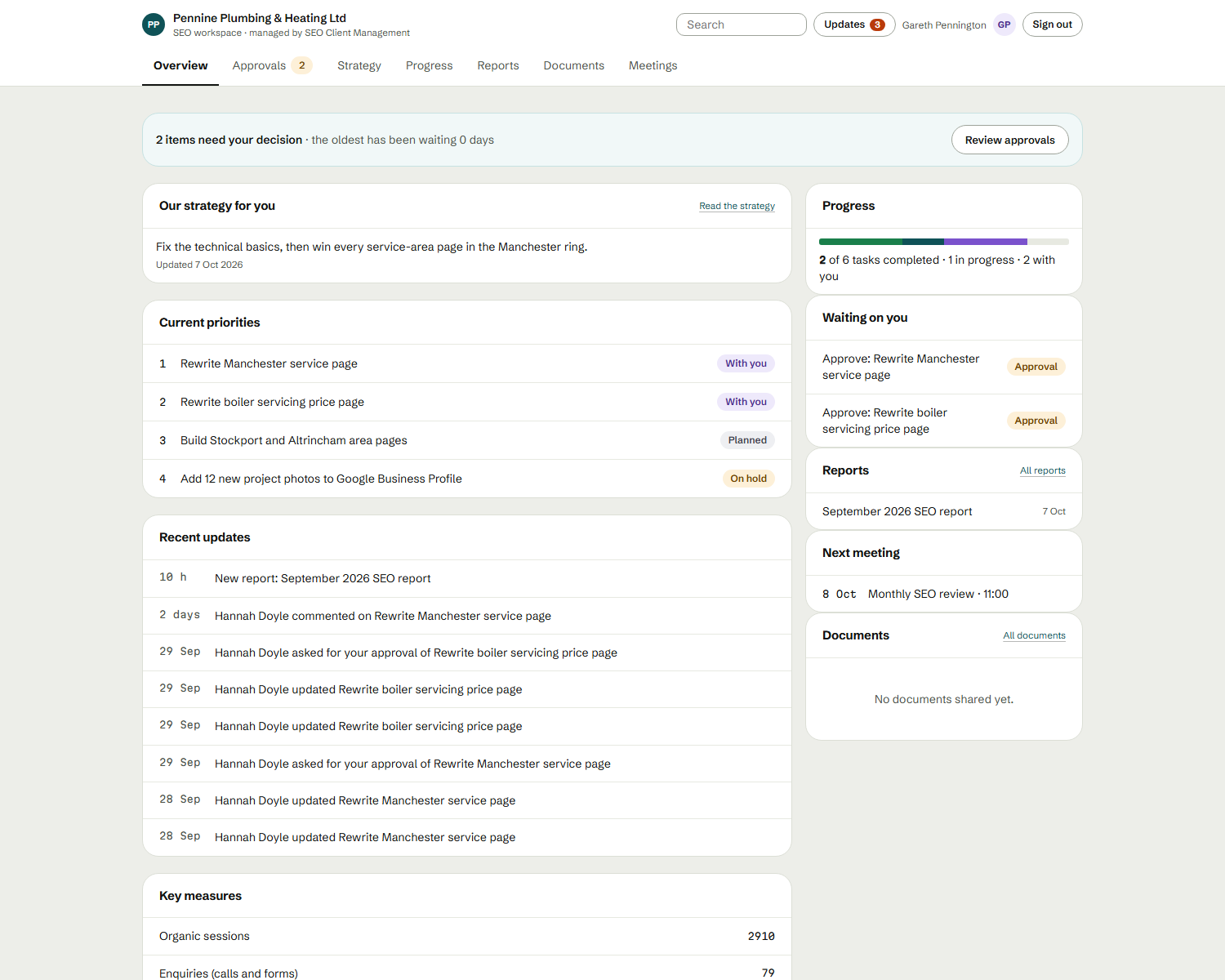
A client-facing view of progress, approvals, strategies, tasks, reports and messages — while internal notes and drafts stay on your side.
What it does
Plain language, focused on what a client actually needs to know.
- Visibility
- Clients see the current state of their SEO work.
- Approvals
- Clients approve what needs their sign-off.
- Strategies
- The approved version of their strategy.
- Tasks
- Progress on the tasks you’ve made visible.
- Reports
- Approved reports, current and past.
- Communication
- Conversation kept with the work it’s about.
- Progress
- A clear sense of what’s moving and what’s done.
The problem it solves
Clients ask for updates by email, approvals get lost in threads, and sharing your project tool exposes internal discussion.
Why it matters
A dedicated portal gives clients a clear, current view and a place to approve, while your internal workspace stays internal.
Where it fits in the workflow
Where the client sees the result.
The full workflow →Who benefits
- Account managers Keep client work, approvals and reporting organised and moving.
- Agency owners See every client, workload and strategy without chasing updates.
- SEO agencies One central place for every client’s strategy, tasks and reporting.