Client management
Every client, organised inside WordPress.
Keep client records, contacts, status and all of their SEO work together — and decide exactly what each client can see.
What it does
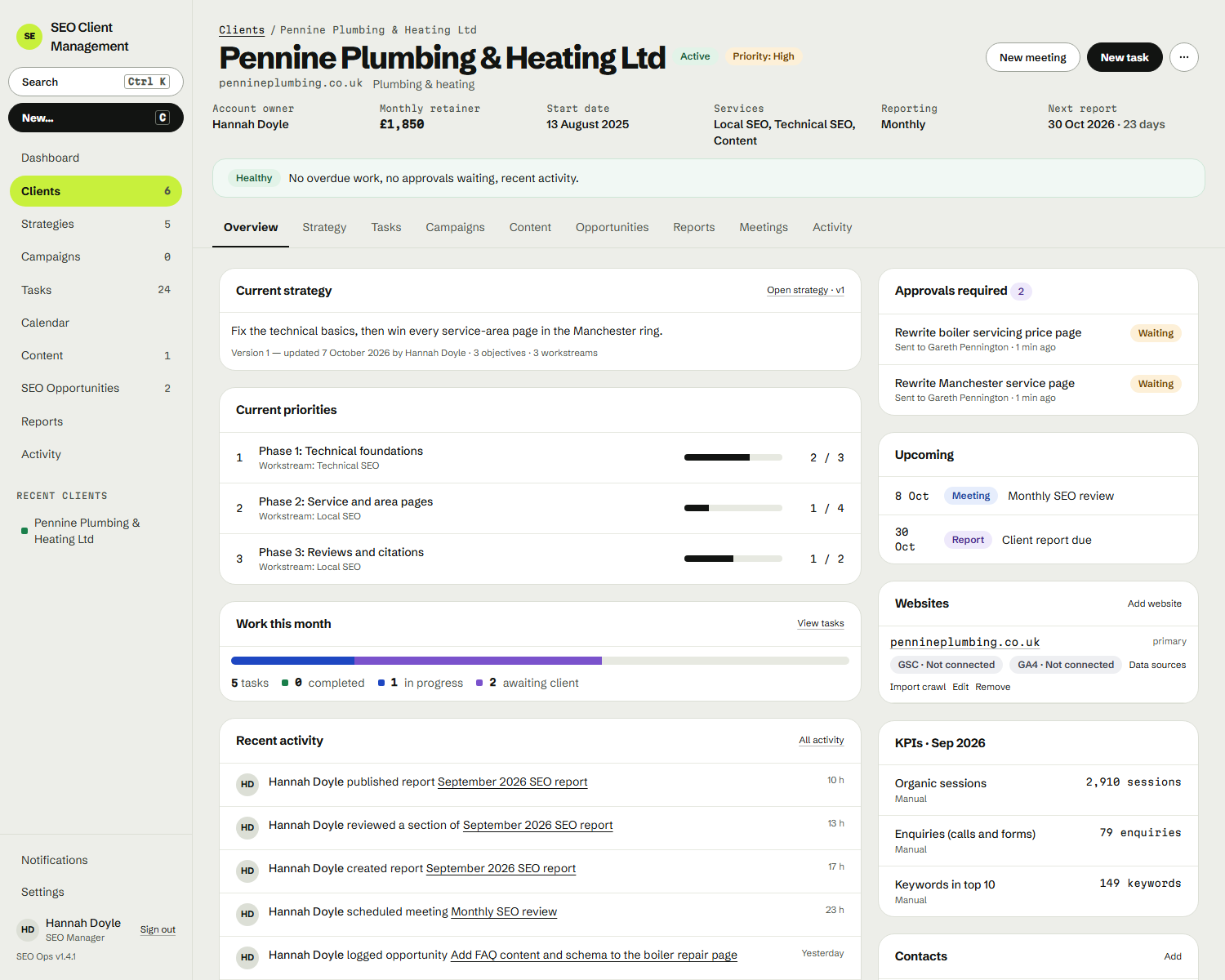
The client record is the hub. Strategies, tasks, reports and the portal all hang off it.
- Client records
- One record per client that every piece of work connects to.
- Contacts
- The people you work with at each client, kept with the account.
- Client information
- The details your team needs, without digging through email.
- Client status
- See where each client stands at a glance.
- Client organisation
- Sort and group clients the way your agency works.
- Client-specific SEO work
- Strategies, tasks and reports attached to the right client.
- Client portal
- Each client gets their own window onto their work.
- Client visibility
- You choose what each client can and can’t see.
The problem it solves
Client details live in one tool, the work in another, and the context in someone’s inbox.
Why it matters
When the client record is the centre, every strategy, task and report is one step from the account it belongs to — and anyone on the team can pick up where someone else left off.
Where it fits in the workflow
Where every engagement starts — and what the client sees at the end.
The full workflow →Who benefits
- Agency owners See every client, workload and strategy without chasing updates.
- Account managers Keep client work, approvals and reporting organised and moving.
- Freelance consultants Run clients with structure, without a heavyweight platform.